How to integrate
1. Prepare Payment Token Request
To prepare a payment token request, refer to the required parameters below.
{
  "client_id": "shop1",
  "client_secret": "myshopsecret",
  "channel": "QRCODE",
  "amount": 100,
  "currency": "THB",
  "invoice_no": "INV0001",
  "ref1": "ref1",
  "ref2": "reg2",
  "remark": "reamrk",
  "frontend_redirect_url": "https://yourdomain.com/payment-success",
  "backend_callback_url": "https://yourdomain.com/api/payment-callback",
  "locale": "th"
}
| Parameter | Data Type | Mandatory | Description |
|---|---|---|---|
| client_id | string | Yes | Client ID |
| client_secret | string | Yes | Client Secret |
| channel | string | Yes | Payment Channel |
| amount | float | Yes | Payment Amount |
| currency | string | Yes | Payment Currency |
| invoice_no | string | Yes | Invoice Number |
| ref1 | string | Yes | Reference 1 |
| ref2 | string | No | Reference 2 |
| remark | string | No | Payment Remark |
| frontend_redirect_url | string | No | Frontend Redirect URL |
| backend_callback_url | string | No | Backend Callback URL |
| locale | string | No | [th, en] default is th |
2. Receive Payment Token Response
To receive a payment token response, refer to the sample payment token response below.
{
  "status": "success",
  "access_token": "your-payment-token",
  "expired_at": "2023-04-30T12:34:56Z",
  "expires_in": 3600,
  "web_redirect_url": "https://yourdomain.com/payment-success?token=your-payment-token"
}
| Parameter | Data Type | Mandatory | Description |
|---|---|---|---|
| status | string | Yes | Payment Status |
| access_token | string | Yes | Payment Token |
| expired_at | string | Yes | Expired At |
| expires_in | number | Yes | Expires In |
| web_redirect_url | string | Yes | Web Redirect URL |
3. Redirect to Payment Page
Redirect to payment page via browser. The payment page URL is returned in the Parameter "web_redirect_url".
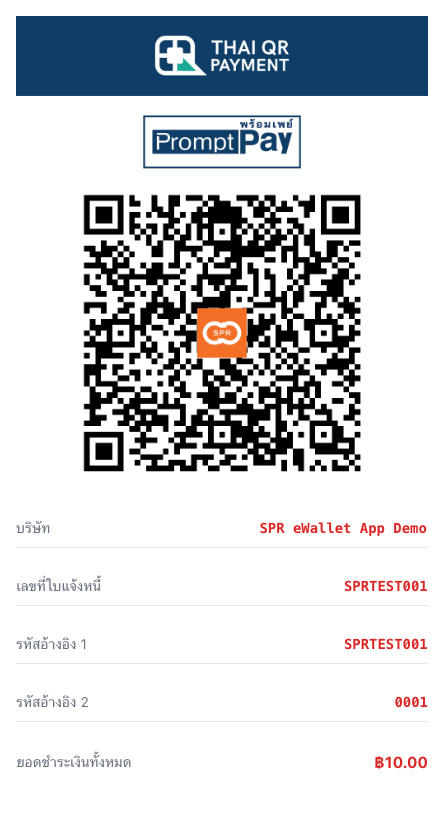
4. Receive Payment Response via backend API
The parameter "backend_callback_url" that was previously sent via Payment Token Request is the merchant endpoint that will receive the backend notification. If the parameter "backend_callback_url" is not set, the system will obtain the backend return URL from the merchant profile set in Superrich QR Pay's merchant portal by default.
{
  "id": 1,
  "company_id": 1,
  "client_id": 1,
  "channel": "QRCODE",
  "amount": 100,
  "currency": "THB",
  "invoice_no": "INV0001",
  "reference1": "ref1",
  "reference2": "reg2",
  "remark": "reamrk",
  "trx_id": "1233123",
  "canceled_at": "2023-04-30T12:34:56Z",
  "canceled_reason": "canceled_reason",
  "status": "COMPLETED",
  "created_at": "2023-04-30T12:34:56Z",
  "expired_at": "2023-04-30T12:34:56Z",
  "completed_at": "2023-04-30T12:34:56Z"
}
| Parameter | Data Type | Mandatory | Description |
|---|---|---|---|
| id | number | Yes | Payment ID |
| company_id | number | Yes | Company ID |
| client_id | number | Yes | Client ID |
| channel | string | Yes | Payment Channel |
| amount | number | Yes | Payment Amount |
| currency | string | Yes | Payment Currency |
| invoice_no | string | Yes | Invoice Number |
| reference1 | string | Yes | Reference 1 |
| reference2 | string | Yes | Reference 2 |
| remark | string | Yes | Payment Remark |
| trx_id | string | Yes | Transaction ID |
| canceled_at | string | Yes | Canceled At |
| canceled_reason | string | Yes | Canceled Reason |
| status | string | Yes | Payment Status |
| created_at | string | Yes | Created At |
| expired_at | string | Yes | Expired At |
| completed_at | string | Yes | Completed At |
5. Receive Payment Response via browser redirection
Fill in the parameter "frontend_redirect_url" with the merchant page that you wish to redirect to. If the parameter "frontend_redirect_url" is not set, the system will obtain the front end return url from the merchant profile set in Superrich QR Pay's merchant portal by default. Refer to the sample response returned below.
{
  "status": "COMPLETED",
  "payment_token": "your-payment-token",
  "invoice_no": "INV0001"
}
| Parameter | Data Type | Mandatory | Description |
|---|---|---|---|
| status | string | Yes | Payment Status |
| payment_token | string | Yes | Payment Token |
| invoice_no | string | Yes | Invoice Number |